bacloud提供一款免费的网盘,支持WebDAV,可用于文件备份。免费用户可使用32G网盘,支持网页版(Nextcloud)上传下载文件,不支持文件分享。
bacloud网盘开通
bacloud网盘注册简单无需手机号信用卡,只需邮箱即可开通。
网址:https://www.bacloud.com/en/cloud-drive

找到BaCloud Drive Free点击右面的按钮开始注册。注册页面是英语。
网盘开通
注册之后可看到网盘处于审核状态,登录注册邮箱点击激活链接,便可开通。
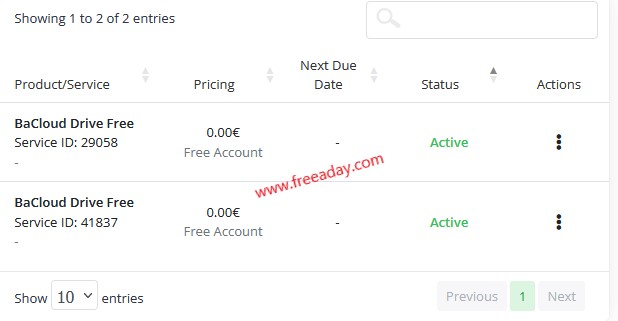
上图已经开通了两个网盘,第一个是一年前开通的,当时只有免费10G容量。开通的第二个,已经是是免费32G容量。
创建用户
创建一个用户账号登录网盘。
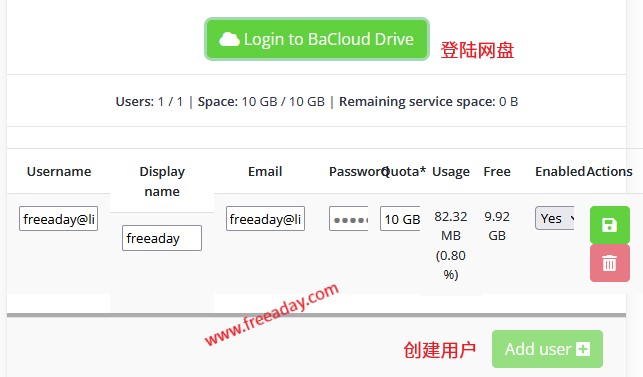
登录地址:https://drive-01.bacloud.online/
Nextcloud网页版
用上图创建的账号登录,来到Nextcloud网页版,可以通过网页上传下载文件,还可以使用WebDAV。

登录网页速度还可以,不支持文件分享。
之前注册过,第二天早上号就被扬了
不至于吧,我这一个号开了俩都没事。
我刚刚下午注册的几个小时就被扬了
现在注册不了了
Thank you for taking the time to register and place your order.
Unfortunately, the account information provided does not meet the eligibility criteria for a Nextcloud 32GB Free Account.
The service will not be provided.
Best Regards,
Ernestas Fokas
E-mail: ernestas.fokas@bacloud.com
现在注册不了了
Thank you for taking the time to register and place your order.
Unfortunately, the account information provided does not meet the eligibility criteria for a Nextcloud 32GB Free Account.
The service will not be provided.
Best Regards,
Ernestas Fokas
我注册好了,但是找不到那里弄webv地址授权码,这个好像也卖vps,域外托管类服务的。